
Build and host MCP servers in one place
Build tools with a code editor, track every request with real-time analytics, and lock down access with four security modes, all from a single dashboard.
Free tier available · No credit card required
const res = await sdk.http({
  method: "GET",
  url   : `https://api.github.com/repos/${params.repo}`,
  headers: {
    Authorization: `Bearer ${env.GITHUB_TOKEN}`
  }
});

const data = JSON.parse(res.body());

return {
  stars   : data.stargazers_count,
  forks   : data.forks_count,
  language: data.language,
};
How it works
From zero to a hosted MCP server in minutes
Create an MCP server
Give your server a name and choose an access mode: Public, API Key, OAuth 2.0, or Bearer Token. Your endpoint is ready in seconds.
Write a tool in JavaScript
Connect to any API or database using sdk.http() and sdk.db(). Store credentials as encrypted secrets, reference them as env.KEY. Test with real parameters before going live.
Point your AI to the endpoint
Copy the server URL into your AI client. Every call is logged, every error is captured, and usage is tracked automatically.
Tool Builder
A professional IDE, inside your browser
Write, test, and deploy MCP tools without leaving the platform. AI generates your code. Test it instantly. One click to go live.
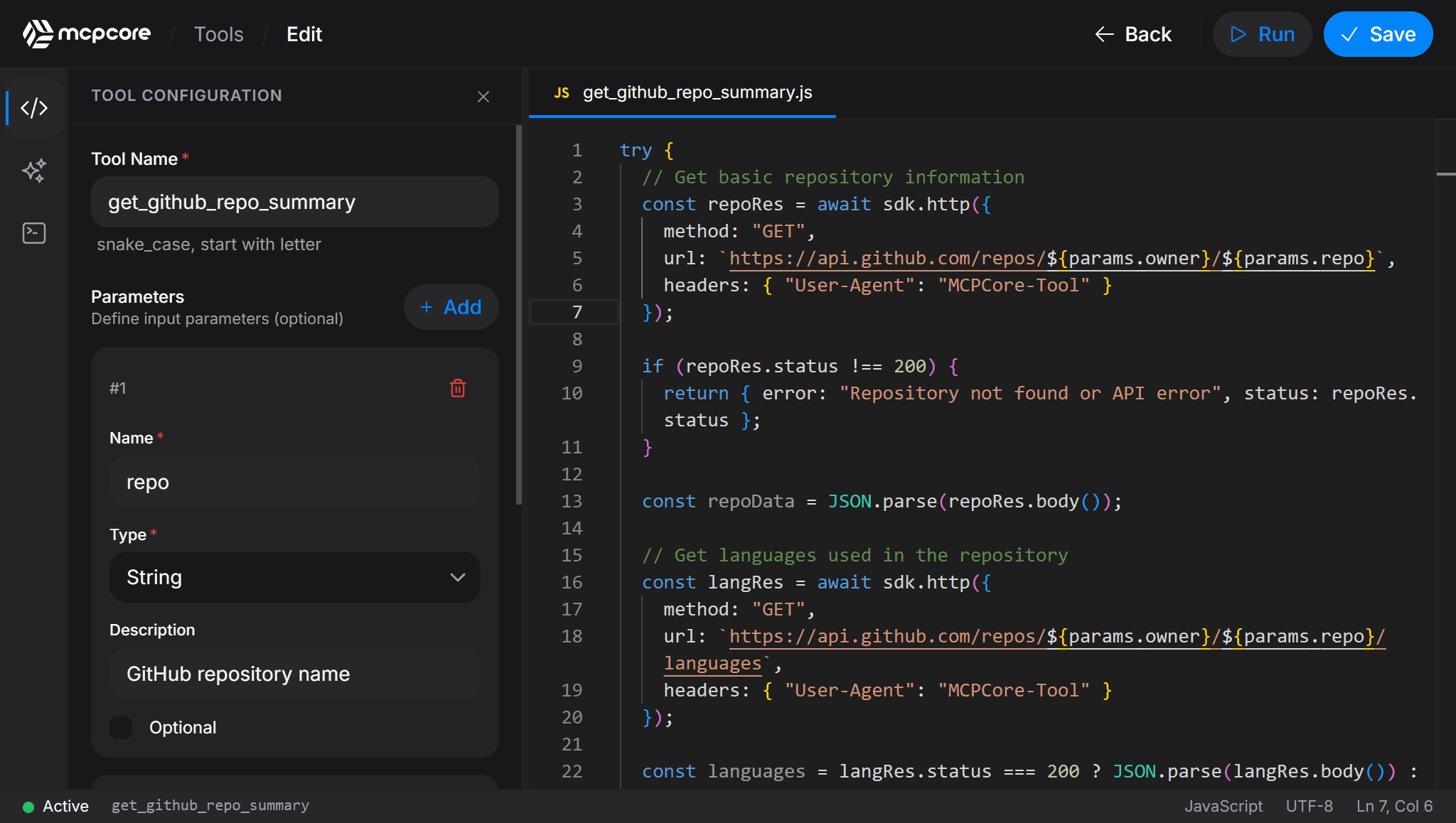
Full IDE in the browser
Professional-grade code editor with autocomplete, syntax highlighting, and live cursor tracking. No local setup needed.
AI-assisted generation
Describe what your tool should do in plain language. The AI agent generates the code, parameters, and name for you.
Instant live testing
Fill in parameter values and run your tool in a secure, isolated environment. Logs stream in real time so you see exactly what your AI will receive.
Visual parameter builder
Define typed input parameters with a drag-and-drop panel. String, number, boolean, object, or array, with optional flags and descriptions.
Security
Access control that fits how you work
Every MCP server gets its own security mode. Mix and match across servers: a public demo server alongside a production server locked behind OAuth.
Access secrets inside your tool code
const apiKey = env.OPENAI_KEY;
const connStr = env.DB_CONNECTION_STRING;
Values are encrypted with AES-256 at rest. Never visible in logs or responses.
No authentication. Anyone with the server URL can call your tools. Ideal for open demos and public datasets.
No auth header neededA per-server key generated from the dashboard. Clients pass it as a request header. Revoke and rotate anytime.
X-API-Key: sk-xxxxxxxxxxDelegate auth to your identity provider. Only users who complete the OAuth flow can call your server.
Authorization: Bearer <oauth_token>Validate signed JWTs on every request. Fine-grained control over expiry, scopes, and who has access.
Authorization: Bearer <your_jwt>Features
Built for every part of building and hosting MCP servers
Write code, connect anything
Tools are plain JavaScript. Use sdk.http() to call any REST API, sdk.db() to query a database, or sdk.lodash for data transformation. Reference secrets as env.MY_KEY with no config files or boilerplate.
Test before you ship
Fill in your tool's parameters and hit Run. Logs stream in real time and you see the exact output your AI will receive, all without deploying or leaving the page.
Encrypted secrets
Store API keys and tokens encrypted with AES-256. Reference them in your tool code as env.MY_KEY. They are never hardcoded, never visible in logs, never exposed in responses.
Error reporting
Every failed execution captures the full stack trace, input parameters, and runtime logs. Jump straight to the problem instead of guessing what went wrong.
4 security modes
Choose per server: Public, API Key, OAuth 2.0, or Bearer Token. Lock down production without touching your tool code. Mix modes across different servers.
Real-time analytics
Track requests, latency, and cost per server in real time. Daily and hourly breakdowns, top tools by call volume, and geographic traffic distribution.
Integrations
Ready-made configs for every AI client
Each server generates copy-paste configuration for 5 major AI clients. No manual URL construction, no header guessing. Just copy and connect.
{
  "mcpServers": {
    "demoMcpServer": {
      "command": "npx",
      "args": [
        "-y",
        "mcp-remote@latest",
        "https://demo.mcpcore.io/mcp"
      ]
    }
  }
}Why MCPCore
Stop wrestling with infrastructure. Start building MCP servers.
Other approaches require CLI tooling, GitHub repos, and DevOps pipelines. MCPCore gives you a browser IDE, one-click deploy, and built-in everything.
In action
No fluff. Just the product.
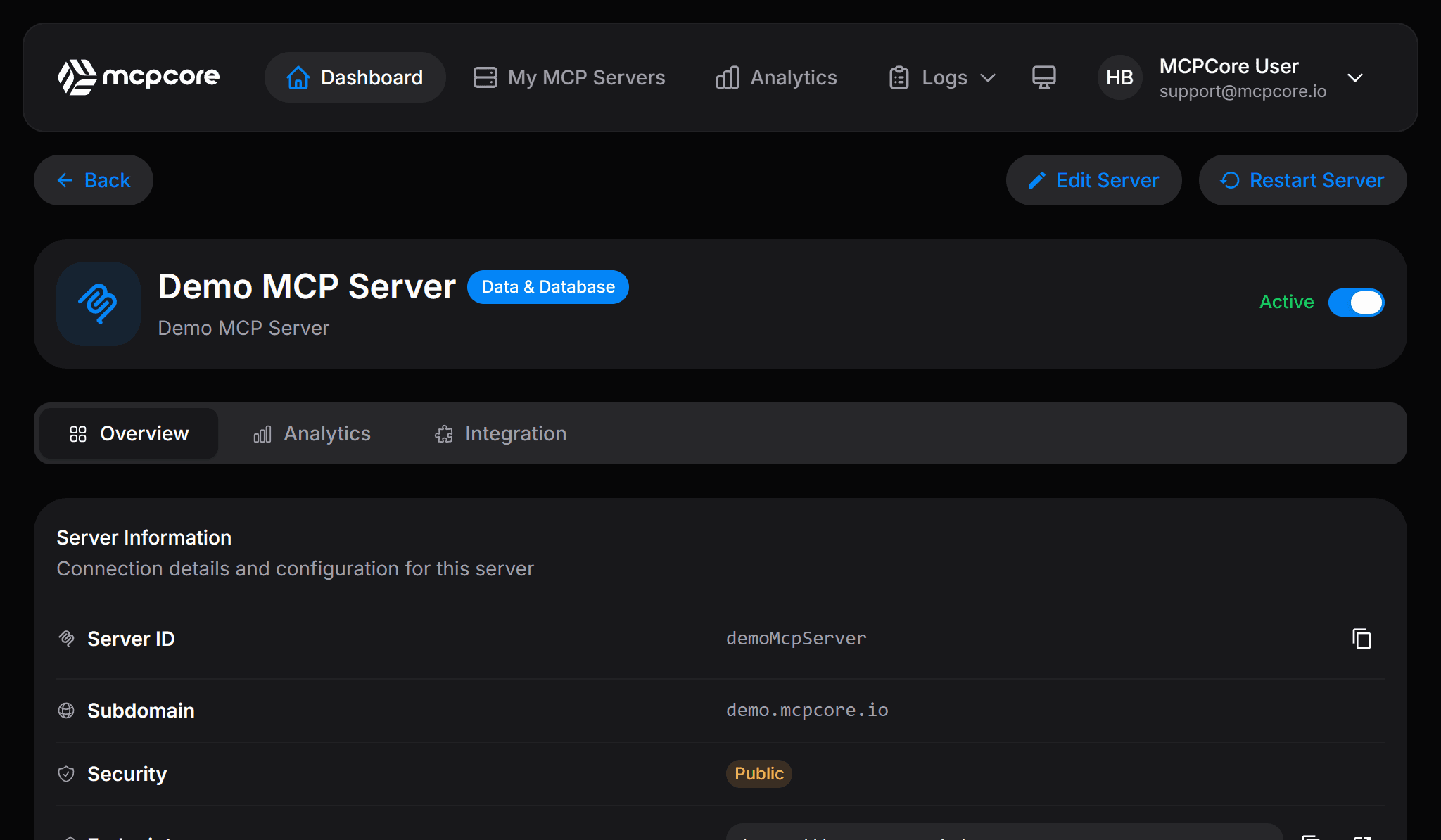
Pulled directly from the live platform. Not a single pixel is mocked up.
Tools, traffic, secrets, and settings in one place.
The server detail page shows your tools, recent logs, endpoint URL, and security configuration on a single screen. No jumping between tabs to get the full picture.
Pricing
Simple, transparent pricing
Free
For developers getting started with MCP.
- MCP Servers (1)
- Tool Calls (10K / mo)
- AI Tool Builder
- Analytics (Basic)
- Support (Community)
Basic
For developers building real integrations.
- MCP Servers (10)
- Tool Calls (200K / mo)
- AI Tool Builder
- Analytics (Basic)
- Support (Email)
Pro
PopularFor teams that need scale and visibility.
- MCP Servers (30)
- Tool Calls (Unlimited)
- AI Tool Builder
- Analytics (Advanced)
- Support (Priority)
Enterprise
Custom solutions with dedicated support.
- MCP Servers (Unlimited)
- Tool Calls (Unlimited)
- AI Tool Builder
- Analytics (Advanced)
- Support (Dedicated)
Full Feature Comparison
See everything included in each plan
| Feature | Free | Basic | Pro | Enterprise |
|---|---|---|---|---|
MCP Servers | 1 | 10 | 30 | Unlimited |
Tool Calls / month | 10K / mo | 200K / mo | Unlimited | Unlimited |
Tools per Server | Unlimited | Unlimited | Unlimited | Unlimited |
AI Tool Builder | ||||
Traffic Logs | 7 days | 30 days | 90 days | 1 year |
Error Logs | 7 days | 30 days | 90 days | 1 year |
Analytics | Basic | Basic | Advanced | Advanced |
Custom Domain | ||||
Support | Community | Priority | Dedicated | |
Uptime SLA | 99.9% |
Need full control? Deploy on your own infrastructure.
Enterprise customers can run MCPCore as a Docker container inside their own environment with complete data sovereignty, custom network policies, and full compliance with internal security requirements.
All prices in USD. Plan changes take effect immediately.
FAQ
Frequently asked questions
What is MCPCore?
MCPCore is a managed platform for building and hosting MCP servers. You write tools in a browser-based IDE and get a live, secured endpoint immediately, without provisioning servers, certificates, or infrastructure yourself.
What is the Model Context Protocol (MCP)?
MCP is an open standard that lets AI assistants like Claude, ChatGPT, and Cursor connect to external tools, data, and services in a structured way. An MCP server exposes callable tools that a compatible AI can discover and use.
Is MCPCore free to use?
Yes. The free tier includes one MCP server with unlimited tools and no credit card required. Paid plans add more servers, higher tool call limits, and longer log retention. See the pricing section above for full details.
Which AI clients can I connect to MCPCore?
MCPCore works with any MCP-compatible client, including Claude Desktop, Claude.ai, Cursor, VS Code, Windsurf, and Cline. Each server generates ready-to-paste configuration snippets for every supported client.
Do I need to know the MCP protocol in detail to use MCPCore?
No. MCPCore handles the MCP protocol, discovery, and schema generation for you. You write plain JavaScript for what a tool should do, and the platform takes care of the rest.
Is my data secure with MCPCore?
Every server supports HTTPS by default, and you choose from four authentication modes: Public, API Key, OAuth 2.0, or Bearer Token. Secrets are encrypted with AES-256 and are never exposed to the AI client or included in logs.
How is MCPCore different from building an MCP server myself?
Self-hosting works, but you build HTTPS, authentication, secrets management, rate limiting, and analytics yourself. MCPCore provisions all of that automatically for every server, so you focus on writing tools instead of infrastructure.
Contact
Get in touch
Questions about MCPCore, pricing, or the Enterprise plan? Fill out the form and we'll get back to you shortly.
Start building today
Free tier available. No credit card required. Get your first MCP server running in minutes.