
MCP Server Builder
Build MCP Servers Without Writing Boilerplate
Create an MCP server and write tools in a full browser IDE, with AI-assisted code generation and instant live testing. No local setup, no protocol boilerplate.
What's included
A complete toolkit to build MCP servers
Everything you need to go from an empty server to a working MCP tool lives in the same browser tab.
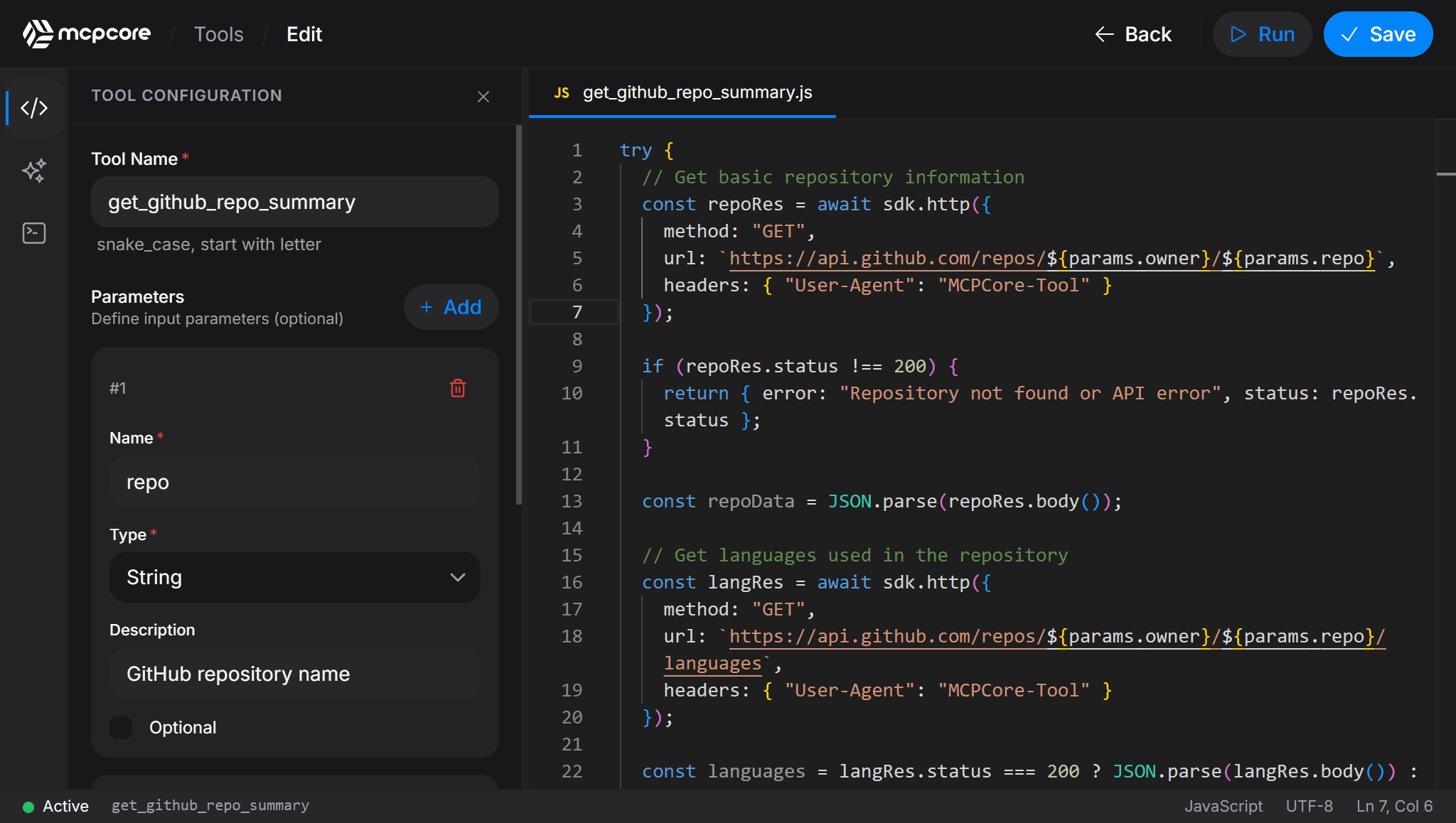
Full IDE in the browser
A professional code editor with autocomplete and syntax highlighting. Create an MCP server and start writing tools with no local install.
AI-assisted generation
Describe what a tool should do in plain language and the AI agent generates the parameters, code, and name for you.
Instant live testing
Fill in parameter values and run the tool in an isolated environment. Logs stream in real time so you see exactly what your AI will receive.
Visual parameter builder
Define typed input parameters with a drag-and-drop panel: string, number, boolean, object, or array, each with optional flags and descriptions.
Built-in SDK helpers
Call any REST API with sdk.http(), query a database with sdk.db(), or transform data with sdk.lodash, all from plain JavaScript.
Encrypted secrets
Store API keys and tokens encrypted with AES-256 and reference them in tool code as env.MY_KEY. Never hardcoded, never logged.
One click from browser to live
When a tool is ready, it goes live on your MCP server's endpoint immediately, with no build step and no deployment pipeline to configure.
Tool Builder
A professional IDE, inside your browser
Build methods compared
MCP framework or SDK vs the MCPCore builder
Writing an MCP server from a framework or SDK works, but it comes with setup steps the browser builder skips entirely.
Build your first MCP server for free
The free tier includes one MCP server, unlimited tools, and access to the full browser IDE. No credit card required to start.
FAQ
MCP server builder questions
How do I create an MCP server with MCPCore?
Sign up for a free account, create a server, choose an access mode, and start writing tools in the browser IDE. The server's endpoint is live as soon as it is created.
Do I need to know the MCP protocol in detail to build a server?
No. MCPCore handles the MCP protocol details, discovery, and tool schema generation for you. You focus on writing the JavaScript that each tool should run.
Can the AI Agent write my MCP tool for me?
Yes. Describe what the tool should do and the AI Agent generates the parameter schema and the JavaScript implementation, which you can then edit and test before it goes live.
What languages can I use to build an MCP server on MCPCore?
Tools are written in JavaScript. You can call external APIs, query databases, and use common utility libraries directly from the built-in SDK.
Do I need to redeploy every time I edit a tool?
No separate deployment step is required. Saving a tool in the builder updates it on the live endpoint immediately.
Start building today
Free tier available. No credit card required. Get your first MCP server running in minutes.